As a design professional, having the right tools can greatly improve productivity and ergonomics. In this article, we will explore the top 10 ergonomic mice designed specifically for designers. The mouse is a critical entry tool that plays an important role in your daily workflow. In the fast-paced world of design, hand and wrist pain can be a common occupational hazard. Long hours spent hunched over a computer can lead to discomfort, fatigue, and even repetitive strain injury (RSI). To combat these issues, ergonomic mice have become a popular solution. They offer a more natural and comfortable grip. This reduces strain on the hands and wrists.
Evaluating Ergonomic Wireless Mice: A Comprehensive Guide
This comprehensive guide carefully evaluates each mouse based on features, design, performance, and suitability for various design tasks. Whether you’re a graphic designer, web designer, or 3D artist, this guide will offer the knowledge you need. It will help you make an informed decision. You will manage to find the perfect ergonomic mouse for your needs.
From precision tracking to superior comfort and functionality, these 10 exceptional designer mice meet a variety of needs. We’ll review each mouse. We’ll highlight its features, pros, and cons. This way, you can find the perfect wireless mouse to enhance your productivity and comfort. Whether you’re a power user or a creative professional, this article is for you. It will give you the insight you need to make an informed decision.
Ergonomic Wireless Mouse Models
- Logitech MX Master 3S Wireless Mouse
- Logitech MX Vertical Wireless Mouse
- Logitech MX Ergo Wireless Trackball Mouse
- Nulea M501 Wireless Trackball Mouse
- Apple Magic Mouse
- Anker Wireless Vertical Ergonomic Optical Mouse
- Lekvey Wireless Vertical Ergonomic Mouse
- ELECOM EX-G Trackball Mouse
- Microsoft Bluetooth Surface Precision Mouse
- Microsoft Modern Mobile Mouse
Key Features to Consider
Before reading detailed product reviews, it’s important to understand the features that make an ergonomic mouse suitable for designers. These features are:
- Grip style: Different mice are designed for different grip styles, like palm, claw, or fingertip. It’s important to consider your natural grip style when choosing a mouse.
- Hand size: Ergonomic mice come in a variety of sizes to fit different hand sizes. Make sure the mouse is comfortable to hold and use to avoid strain.
- Button placement: A mouse with strategically placed buttons can reduce finger and wrist movements, reducing fatigue. Choose a mouse with button placement that works for your workflow.
- Customizability: Customizable features like adjustable DPI, programmable buttons, and multiple scroll wheels can improve your productivity and comfort.
Logitech MX Master 3S Wireless Mouse: Precision and Comfort In One
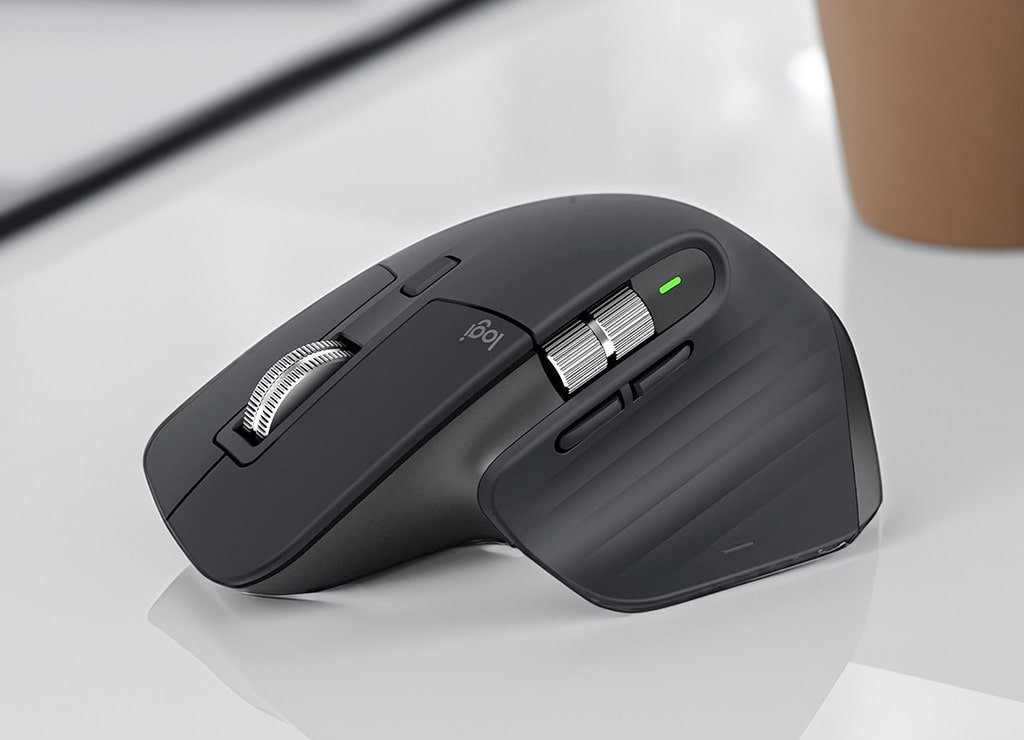
The Logitech MX Master 3S Wireless Mouse is a high-performance device designed to increase productivity and accuracy. It has an ergonomic and comfortable design that lets you work longer hours without discomfort. This mouse connects to your device via Bluetooth or the included USB receiver for a seamless experience. You can download and install Logitech Options software. It lets you change button functions. You can also adjust tracking sensitivity, tilt angle, and scroll wheel tension for personalized control.
This advanced mouse is perfect for anyone looking to streamline their workflow and take their productivity to the next level. With its range of features, the Logitech MX Master 3S excels in providing a precise and comfortable experience. It is ideal for professionals who demand accuracy.
Details
The Logitech MX Master 3S Wireless Mouse is an exceptionally ergonomic mouse designed for comfortable, extended use. Its contoured shape naturally conforms to your hand, reducing strain and increasing comfort. The mouse features a customizable thumb wheel and a smooth, responsive scroll wheel for seamless horizontal scrolling. With 8 programmable buttons and hyper-fast MagSpeed electromagnetic scrolling, the MX Master 3S seamlessly adapts to your workflow.
increasing comfort. The mouse features a customizable thumb wheel and a smooth, responsive scroll wheel for seamless horizontal scrolling. With 8 programmable buttons and hyper-fast MagSpeed electromagnetic scrolling, the MX Master 3S seamlessly adapts to your workflow.
Additionally, the mouse features Logitech’s Darkfield Laser Tracking technology for precise control on virtually any surface, including glass. The high-precision sensor provides accurate tracking and glides smoothly across any surface. The soft rubber grips provide a secure and comfortable grip, while the sleek, modern design looks great on any desk. The Logitech MX Master 3S Wireless Mouse offers an outstanding combination of comfort and precision. Its adaptability makes it an excellent choice for anyone in need of a high-performance mouse.
Pros
- Ergonomic design for comfortable, extended use
- Customizable buttons and scrolling speed to suit your preferences and needs.
- High-precision sensor for precise tracking.
- Long battery life allows extended use without frequent recharging.
- Supports multiple device connections, making it easy to switch between devices.
Cons
- Relatively high price compared to standard mice on the market.
- Some users may find the shape bulky at first.
- Although it has customizable buttons, the mouse is relatively expensive.
- Left-handed users may find it unsuitable due to right-handed orientation.
- May be too large for users with smaller hands.
Specifications
- Enjoy seamless connectivity with this wireless mouse that offers both Bluetooth and Unifying USB receiver connection options.
- The mouse features a high-precision darkfield laser sensor for accurate and precise tracking on any surface, including glass.
- With up to 8,000 DPI, this mouse offers incredible precision and speed, allowing you to navigate your computer with ease.
- The mouse comes with 7 programmable buttons that you can customize for quick access to your most-used functions.
- The battery life lasts up to 70 days on a single charge. You won’t have to worry about recharging your mouse.
- This mouse is compatible with both Windows and MacOS, making it ideal for a wide range of users.
- The design of this wireless mouse is sleek. It is stylish. This makes it a great addition to any workspace or home office.
Who is the Logitech MX Master 3S for?
This wireless mouse is an excellent choice for design professionals who demand precision, comfort, and versatility in their daily workflow. Its ergonomic design and advanced features make it a great choice for extended use and demanding tasks. Design professionals are not the only ones who can gain from the Logitech MX Master 3S. Other professionals and anyone who needs a high-performance, versatile wireless mouse will also find it beneficial.
Logitech MX Vertical Wireless Mouse: Ergonomic Excellence for Health-Conscious Users
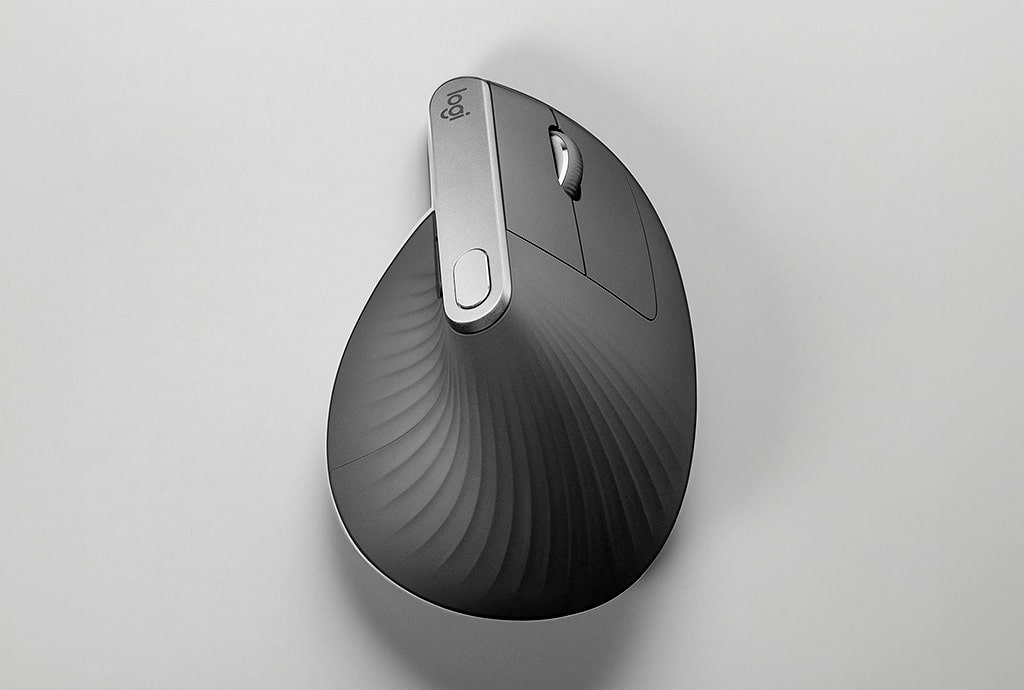
The Logitech MX Vertical Wireless Mouse is a unique and innovative device. It is designed to reduce wrist strain. It promotes a more natural hand position. Its advanced optical tracking technology gives users precise cursor control. The mouse comes with 7 programmable buttons. It features a customizable scroll wheel and hyper-fast MagSpeed electromagnetic scrolling. The mouse provides a secure grip. It is comfortable, making it ideal for those who experience wrist pain. This discomfort often occurs when using traditional mice. You can connect the Logitech MX Vertical Wireless Mouse via Bluetooth or a USB receiver. It also offers customizable features through Logitech Options software. This mouse is a great choice for anyone looking for a comfortable and personalized computing experience.
Details
The MX Vertical features Logitech’s Darkfield laser tracking technology for precise control on a variety of surfaces. Its vertical design encourages a natural grip, reducing forearm twisting and promoting a more relaxed hand position. The mouse is rechargeable for extended use between charges, making it a convenient choice for users on the go. Customizable buttons and a responsive scroll wheel increase productivity. Meanwhile, soft rubber grips and a smooth glide surface give a comfortable grip. The Logitech MX Vertical Wireless Mouse is a reliable and ergonomic device. It efficiently meets the needs of designers. Additionally, it is ideal for anyone who values comfort and precision.
Specifications
- Connectivity: The product can be connected via either Bluetooth or a Unifying USB receiver.
- Sensor: The product features an advanced darkfield laser sensor with up to 8,000 DPI sensitivity for precise and exact tracking.
- Buttons: The product comes with 7 programmable buttons that can be customized according to the user’s needs.
- Battery Life: The product offers a long battery life of up to 70 days on a single charge. This makes it ideal for extended use.
- DPI: The product has a sensitivity range of 400-4000 DPI, making it suitable for a wide range of activities.
- Compatibility: Compatible with both Windows and MacOS operating systems.
Pros
- Ergonomic vertical design reduces wrist strain and provides a comfortable grip.
- Advanced optical and darkfield laser tracking provides precise cursor control on a variety of surfaces.
- Customizable buttons and scroll wheels help you personalize your workflow and increase productivity.
- Long battery life (up to 4 months on a single charge) increases productivity and reduces the need for frequent recharging.
- Supports multi-device connectivity (up to three devices) for seamless transitions between devices.
Cons
- Vertical orientation may take some getting used to, especially for users used to traditional mouse designs.
- The mouse may not work for users with small hands.
- The price of the Logitech MX Vertical Wireless Mouse is relatively high. It is more expensive compared to some alternatives on the market.
Who should use the Logitech MX Vertical Wireless Mouse?
This product is perfect for professionals who value ergonomic health. They need a mouse that can help reduce wrist discomfort during extended use. It is also ideal for designers who suffer from wrist pain or discomfort caused by traditional mice. The Logitech MX Master 3S is an excellent wireless mouse that offers high performance and versatility. Its ergonomic design and advanced features make it a great choice for extended use and demanding tasks. This makes it an excellent choice for designers, professionals, and anyone who needs a high-quality wireless mouse.
Logitech MX Ergo Wireless Trackball Mouse: Precision and Comfort Redefined
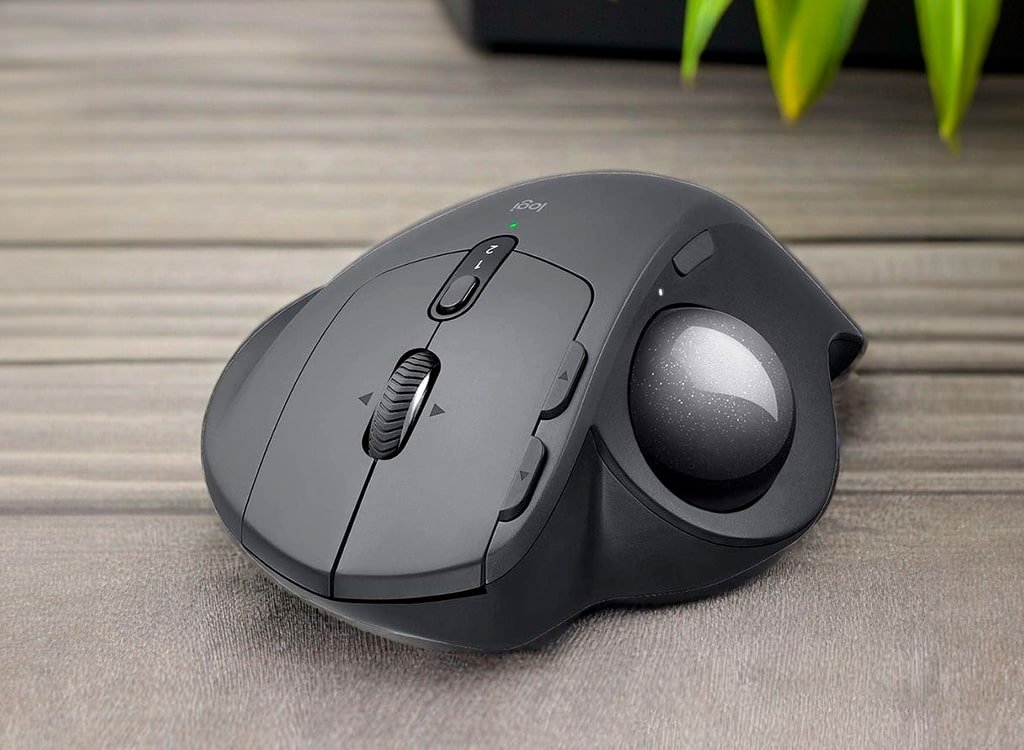
The Logitech MX Ergo Wireless Trackball Mouse is an innovative and ergonomic device that enhances productivity and comfort. Its unique design features a trackball. This design allows for easy navigation without constant wrist movement. It is especially helpful for those with wrist pain or other ergonomic issues. The mouse can connect to a computer via Bluetooth or a USB receiver, providing flexibility in use.
Additionally, Logitech Options software lets users adjust button functions and tracking sensitivity for personalized functionality. The tilt angle and scroll wheel tension can also be adjusted for a personalized control experience. Reviewers have praised the MX Ergo’s innovative design, versatility and ease of use, as well as its long-lasting rechargeable battery. The Logitech MX Ergo is a high-performance wireless trackball mouse. It offers a range of features to meet the needs of a variety of users.
Details
The Logitech MX Ergo Wireless Trackball Mouse is a premium ergonomic mouse designed to provide users with precision, comfort, and functionality. Its sculpted, adjustable design allows for a natural hand and wrist position, reducing repetitive strain injury. The large trackball provides precise cursor control, while the customizable buttons and scroll wheel offer additional functionality.
The MX Ergo features dual wireless connectivity, a precision mode button for fine cursor control and a rechargeable battery. With 16 programmable buttons, a customizable scroll wheel and a precision trackball, designers have all the tools they need. The soft rubber grips and adjustable palm rest provide a comfortable grip and support. The Logitech MX Ergo Wireless Trackball Mouse is a premium ergonomic mouse that offers unparalleled precision, comfort, and functionality for designers and anyone who needs precise cursor control.
Specifications
- This product offers versatile connectivity options. You can connect via either Bluetooth or a USB receiver. This offers flexibility and convenience.
- The trackball is equipped with a precision mode button for precise tracking and smooth scrolling.
- This device has a battery life of up to 4 months on a full charge. You can use it for extended periods of time. You won’t have to worry about recharging often.
- This device is compatible with both Windows and MacOS, making it an ideal choice for users of both operating systems.
- The DPI of this device ranges from 200 to 4000, ensuring exact and precise tracking for your specific needs.
- There are 8 programmable buttons available, which can be customized to suit your preferences and needs.
- The optical sensor of this device provides up to 440 DPI, ensuring precise and smooth tracking on most surfaces.
- This device offers wireless connectivity via Bluetooth or a Unifying USB receiver. You have the freedom to connect to your device in the way that works best for you.
- The battery life of this device lasts up to 4 months on a single charge, giving you long-lasting performance.
Pros
- Adjustable ergonomic design allows for a personalized and comfortable experience, reducing strain on arms and hands.
- Precise trackball operation provides precise cursor control, making it ideal for tasks that require a high degree of accuracy.
- The customizable buttons and scroll wheel increase productivity, allowing you to streamline your workflow and work more efficiently.
- The long battery life means you can use it for extended periods of time without worrying about changing batteries.
- The dual wireless connectivity offers more flexibility and convenience, allowing you to connect to multiple devices.
Cons
- The trackball may take some getting used to, especially for new users used to traditional mice.
- It is relatively large and bulky. This may be an issue for those who prefer smaller mice.
- The higher price compared to traditional mice may be a drawback for some people on a budget.
Who should use the Logitech MX Ergo trackball mouse?
The Logitech MX Ergo is an ideal choice for professionals who need precise cursor control. It also offers ergonomic comfort, particularly benefiting graphic designers and video editors. This trackball mouse is designed to give utmost comfort and precision for designers who prefer a trackball mouse. Its adjustable design and advanced features make it an excellent choice for those who value comfort and productivity. It’s perfect for designers, engineers and anyone who needs the precision and ergonomics of a trackball mouse.
Nulea M501 Wireless Trackball Mouse: Affordable Ergonomic Excellence
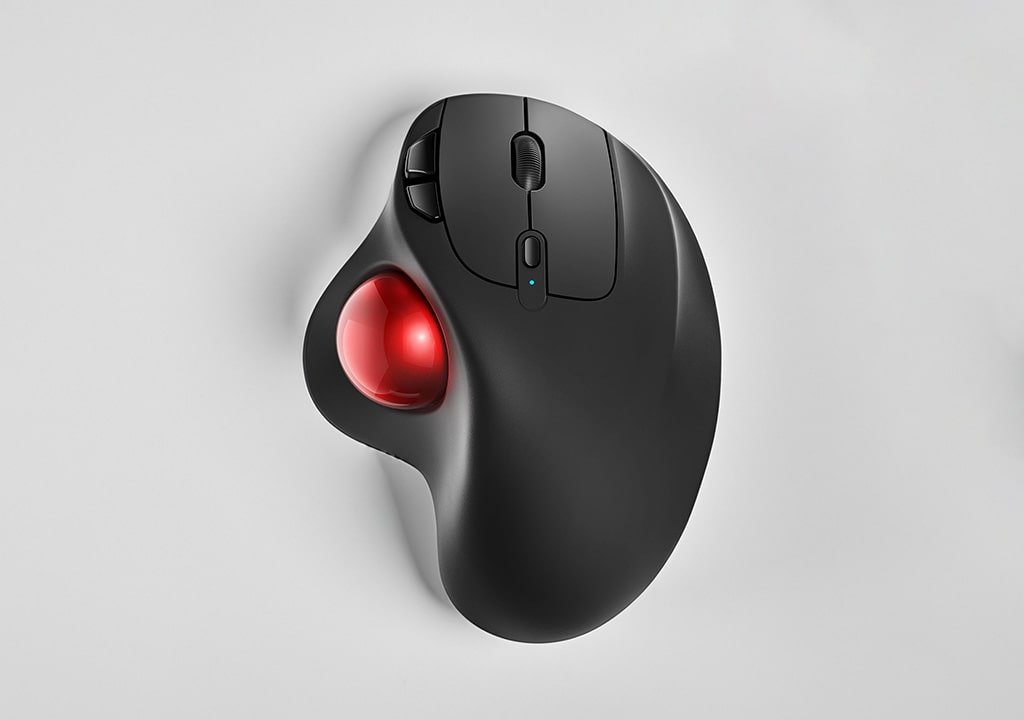
The Nulea M501 Trackball Mouse is designed with several features to guarantee a comfortable and productive user experience. The ergonomic design of the Nulea M501 fits perfectly in the palm of your hand. This lets you work for long periods of time without strain. With its customizable features, this mouse offers various options. You can adjust the tracking sensitivity via the DPI button to suit your needs. You can connect the mouse to your computer via Bluetooth. Alternatively, you can use the included USB receiver. This gives you the flexibility to use it anywhere. The Nulea M501 also comes with a USB charging cable for added convenience. Whether you’re a professional or an occasional user, the Nulea M501 is the perfect choice. It is ideal for anyone wanting a reliable, comfortable, and efficient wireless trackball mouse.
Details
The Nulea M501 Wireless Trackball Mouse, is an ergonomic device that offers excellent control and comfort at an affordable price. Its symmetrical design accommodates both left- and right-handed users, while the large trackball provides smooth and precise cursor control. The rechargeable battery provides extended use on a single charge. The mouse is equipped with six programmable buttons, a clickable scroll wheel, and a customizable precision trackball. It is an essential tool for designers. The soft rubber grips offer a secure and comfortable grip, while the smooth glide surface allows for effortless movement. The ergonomic design promotes a natural hand position, reducing strain and fatigue during extended use. The Nulea M501 is an excellent choice for anyone seeking an affordable, high-quality trackball mouse. It focuses on functionality, comfort, and design.
Specifications
- This product offers multiple connectivity options. It includes Bluetooth and a USB receiver. This setup gives you the flexibility to connect to your device of choice.
- The trackball’s symmetrical design ensures a comfortable grip, making it easy to navigate and control your device.
- The device has a battery life of up to 2 months on a full charge. You can enjoy uninterrupted use. There’s no need to worry about recharging often.
- This product is compatible with both Windows and MacOS, ensuring it can be used with a wide range of devices.
- It features a DPI of 800-1600-3200. This provides you with precise and exact cursor movement. It is ideal for tasks that need high precision.
- The 2.4GHz wireless connectivity of this product ensures a stable and reliable connection, providing you with uninterrupted use.
- This product has 6 programmable buttons. You can customize it to suit your needs. This feature makes it ideal for both work and play.
Pros
- The mouse is reasonably priced compared to similar ergonomic mice on the market.
- It has a symmetrical design that works well for both left- and right-handed users.
- The smooth trackball operation provides precise cursor control.
- The mouse has a rechargeable battery for convenience and to save money on frequent battery changes.
- It has customizable buttons and a scroll wheel, allowing users to personalize their experience.
- The product offers a comfortable, ergonomic design that reduces discomfort and strain during extended use.
- The mouse has a long battery life, making it ideal for extended use.
- The trackball is precise and responsive, allowing for accurate cursor movements.
Cons
- The mouse lacks advanced customization options. This is important for users who need more personalized settings compared to premium models.
- The mouse has a long battery life. Nonetheless, it is shorter than higher-end trackball mice. This is a drawback for users who need to use the mouse for extended periods of time.
- The trackball does not have a tilt adjustment, which is a disadvantage for users who need this feature.
Who is the Nulea M501 Wireless Trackball for?
The ergonomic trackball mouse is designed for professionals who want comfortable, precise cursor control without compromising on quality. It’s a great choice for budget-conscious designers who need a functional and comfortable trackball mouse. The Nulea M501 is an excellent choice for designers and engineers. It is also suitable for anyone who prefers the precision and ergonomics of a trackball mouse. Its comfortable design and long-lasting battery make it a great option for those who value both performance and comfort.
Apple Magic Mouse: Sleek Design, Seamless Integration
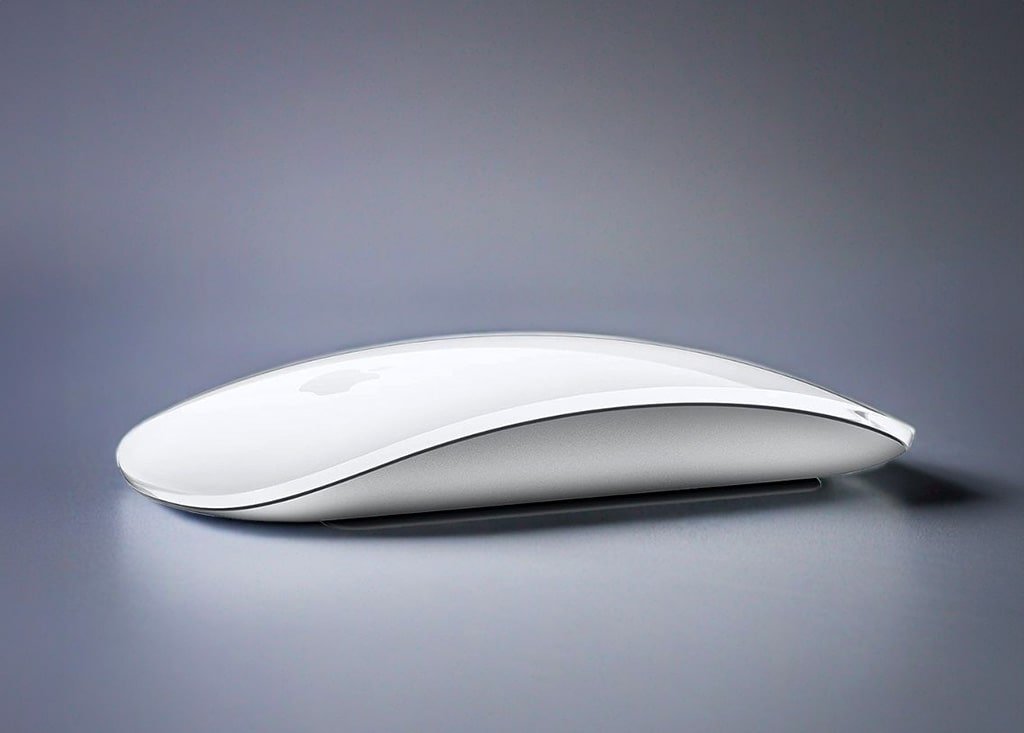
The Apple Magic Mouse is a sleek and intuitive wireless mouse. It features a unique touch surface for effortless navigation. It also offers gesture control. This minimalist mouse pairs seamlessly with your Mac via Bluetooth for instant connectivity and a clutter-free workspace. The Multi-Touch surface lets you smoothly scroll, swipe, and zoom, making it ideal for creative professionals and everyday users alike. The tracking speed and gestures can be customized in System Preferences for a truly personalized experience. The Apple Magic Mouse has a minimalist design. It also boasts advanced features. It is a must-have accessory for anyone seeking an enhanced computing experience.
Details
The Apple Magic Mouse is a premium device with a minimalist design and seamless integration with Mac devices. It has a sleek profile complemented by a smooth and seamless touch-sensitive surface that enables intuitive gestures and swipes. These gestures allow users to perform a variety of actions, such as scrolling, zooming and switching between applications, without the need for physical buttons. The mouse connects wirelessly via Bluetooth and can be recharged with the included Lightning cable for extended use between charges. Featuring a Multi-Touch surface, the Magic Mouse is designed for Mac users’ workflows, with a low-profile design and smooth glide to reduce finger fatigue.
In addition, the Magic Mouse is ambidextrous, providing a comfortable grip for both left- and right-handed users. All in all, the Apple Magic Mouse is an excellent choice for anyone looking for a high-quality, functional mouse that integrates seamlessly with their Mac.
Specifications
- Connectivity: Wireless mouse uses Bluetooth technology to connect to your device.
- Surface: The multi-touch surface provides smooth, precise control so you can navigate your device with ease.
- DPI: The mouse has an adjustable DPI setting that can be easily configured through your device’s system preferences.
- Sensor: The optical sensor delivers up to 1,300 DPI for precise, responsive control of your device.
- Buttons: The mouse has 2 touch-sensitive buttons that are easy to press for quick access to your device’s features.
- Battery life: The mouse can last up to 2 months on a single charge. This depends on usage. This makes it a reliable and long-lasting accessory.
- Compatibility: The mouse is compatible with MacOS, making it an ideal accessory for Mac users.
Pros
- Sleek, minimalist design that complements any Mac device.
- Intuitive touch interface that allows for effortless multi-touch gestures.
- Wireless Bluetooth connectivity for a seamless connection to Apple devices.
- Rechargeable battery for extended use.
- Seamless integration with the macOS ecosystem that enhances productivity.
Cons
- Limited compatibility with non-Apple devices, which may be a drawback for some users.
- Higher price compared to traditional mice, which may not be affordable for everyone.
- Limited customization options compared to other wireless mice, which may not suit everyone’s preferences.
Who is the Apple Magic Mouse for?
The Apple Magic Mouse is designed for Mac users who value minimalist design and intuitive Multi-Touch gestures. It is an excellent choice for design professionals and those in creative or office-based professions. Its sleek and streamlined design with touch-based controls makes it perfect for those who prefer a clean workspace.
Anker Wireless Vertical Ergonomic Optical Mouse: Comfortable and Affordable Ergonomic Solution
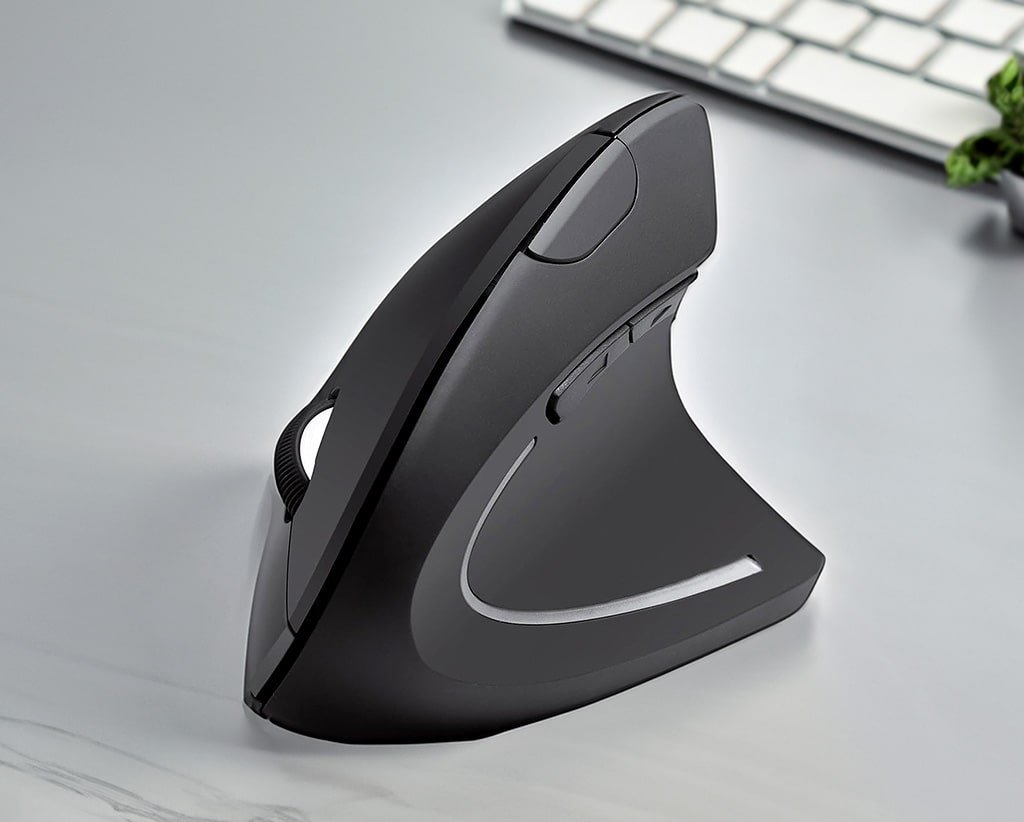
The Anker Wireless Vertical Ergonomic Optical Mouse has been praised by many for its innovative design. It reduces wrist strain and promotes a more natural hand position. The mouse can be connected to your computer via the included USB receiver or Bluetooth. The DPI button lets you adjust tracking sensitivity for a customizable user experience. Additionally, the mouse can be charged using the included USB cable. Overall, the Anker Wireless Vertical Ergonomic Optical Mouse has received positive reviews for its comfort. It is easy to use and functional. This makes it a great choice for anyone in need of an ergonomic pointing device.
Details
The Anker Wireless Vertical Ergonomic Optical Mouse is an affordable solution. It is comfortable for professionals who spend long hours in front of their computer. Its unique vertical design promotes a natural grip position. This design reduces wrist and forearm strain. It is a great choice for those seeking wrist relief.
The mouse’s optical sensor provides precise cursor control. Its 5 programmable buttons and clickable scroll wheel are extremely useful. Hyper-fast optical tracking meets the needs of designers. The soft rubber grips and smooth glide surface make it comfortable to hold and easy to use. The mouse connects wirelessly via a 2.4 GHz USB receiver. It offers long-lasting battery life. This feature makes it reliable for people who want to avoid the hassle of cords. It is also convenient for those avoiding frequent recharging.
Specifications
- Connectivity: This product can connect to your device using either Bluetooth or a USB receiver.
- Sensor: Optical sensor is used in this product to give exact and precise motion tracking.
- DPI: The device offers multiple DPI options. These options include 1000, 1600, 2400, and 3200 DPI. You can choose the sensitivity level that suits your needs.
- Buttons: The device has at least 5 programmable buttons, allowing you to modify your experience and improve your productivity.
- Battery life: The product boasts a long battery life. The various models have a battery life ranging from 2 months to 18 months on a single charge.
- Compatibility: The device is compatible with both Windows and MacOS operating systems, making it a versatile choice for multi-platform users.
- Wireless connectivity: One model features 2.4GHz wireless connectivity, giving you the freedom to move around without being tethered to your device.
Pros
- Ergonomic vertical design reduces wrist strain, discomfort, and forearm twisting.
- Affordable price compared to higher-end ergonomic mice.
- Optical sensor provides precise cursor control on a variety of surfaces.
- Customizable buttons increase functionality and comfort.
- Exceptional battery life that eliminates the need for frequent recharging and reduces environmental impact.
Cons
- Vertical orientation may require an adjustment period for some users.
- Limited customization options compared to higher-end models, especially when it comes to button mapping.
- No mouse tilt adjustment, which may be a deal-breaker for some users.
Who is the Anker Ergonomic Mouse designed for?
The Anker Wireless Vertical Ergonomic Optical Mouse is an excellent choice for professionals who value ergonomic comfort. It is also affordable for those looking to relieve wrist strain during prolonged computer use. It is especially helpful for designers, office workers, and anyone who spends long periods of time using a computer mouse. Its ergonomic design and long-lasting battery make it a great choice for those who value comfort and productivity.
Lekvey Wireless Vertical Ergonomic Mouse: Sleek Design, Enhanced Comfort
Introducing the Lekvey Wireless Vertical Ergonomic Mouse. It is a comfortable and ergonomic pointing device. It is designed to give a natural hand position. It also reduces wrist strain. This mouse is sleek and stylish. It offers improved productivity. It provides a more comfortable experience for those who spend long hours at the computer. You have the choice to connect via Bluetooth.
Alternatively, you can use the USB receiver. This way, you can easily set up and enjoy the mouse’s ergonomic features. The DPI button lets you adjust tracking sensitivity to your liking. The included USB cable keeps the mouse charged and ready to go. Whether you’re a professional or a casual user, the Lekvey Wireless Vertical Ergonomic Mouse is a reliable choice. It offers ergonomic features that enhance your computing experience.

Details
The Lekvey Wireless Vertical Ergonomic Mouse is a stylish and comfortable mouse. It promotes natural hand positioning. This reduces wrist strain and provides a more comfortable user experience. With adjustable DPI settings, users can enjoy precise cursor control. The soft rubber grips offer a secure grip. The smooth glide surface ensures effortless handling. The mouse features six programmable buttons, a clickable scroll wheel and responsive optical tracking, making it ideal for designers.
In addition, the Lekvey Vertical Mouse connects wirelessly via a 2.4GHz USB receiver and has a long battery life for uninterrupted use. The Lekvey Vertical Ergonomic Mouse is a great choice for those seeking comfort and functionality. It helps reduce wrist strain and improve productivity.
Specifications
- Connectivity: This mouse connects via Bluetooth and USB receiver, giving you multiple ways to connect to your computer. The mouse uses 2.4 GHz wireless technology for a reliable and stable connection.
- DPI Settings: The DPI settings on this mouse are adjustable, making it easy to change and personalize your experience.
- Battery life: This mouse lasts up to 12 months on a full charge. This means you can use it for a long time without worrying about the battery running out.
- Compatibility: This mouse is compatible with Windows, MacOS, and Linux, so you can use it with a variety of devices.
- Sensor: The optical sensor on this mouse can detect up to 1,600 dpi of movement. This ability allows it to work on a variety of surfaces.
- Buttons: The mouse has six programmable buttons. They can be customized to execute different functions. This customization makes it easy to navigate and use.
Pros
- Unique and modern design enhances workspace aesthetics.
- Vertical orientation reduces wrist strain and forearm twisting, promoting ergonomic health.
- Adjustable DPI settings provide a customizable cursor control experience.
- Long battery life provides extended use between charges.
- Affordable price makes it accessible to a wider audience.
- Programmable buttons can be customized for specific tasks.
Cons
- May take some time to get used to the vertical grip, especially for users used to traditional mice.
- Fewer programmable buttons than some high-end competitors.
- No mouse tilt adjustment.
- Button customization software may not be as easy to use as some other options.
- May not offer as many customization options as premium models.
- Vertical design may be uncomfortable for some users at first.
Who should use the Lekvey Vertical Ergonomic Mouse?
The Lekvey Wireless Vertical Ergonomic Mouse is a great choice for those who value comfort and productivity. It is designed for professionals and designers. They are looking for a stylish, affordable, and comfortable mouse. This mouse can alleviate wrist discomfort without compromising on aesthetics. The ergonomic design makes it a perfect choice for office workers.
Its long-lasting battery is ideal for anyone who spends long periods of time using a computer mouse. With more customizable buttons, designers can enjoy an excellent experience with this vertical mouse. The mouse is an excellent choice for those seeking a comfortable and efficient device. It can improve productivity. It also enhances well-being.
ELECOM EX-G Trackball Mouse: Precision and Performance for Design
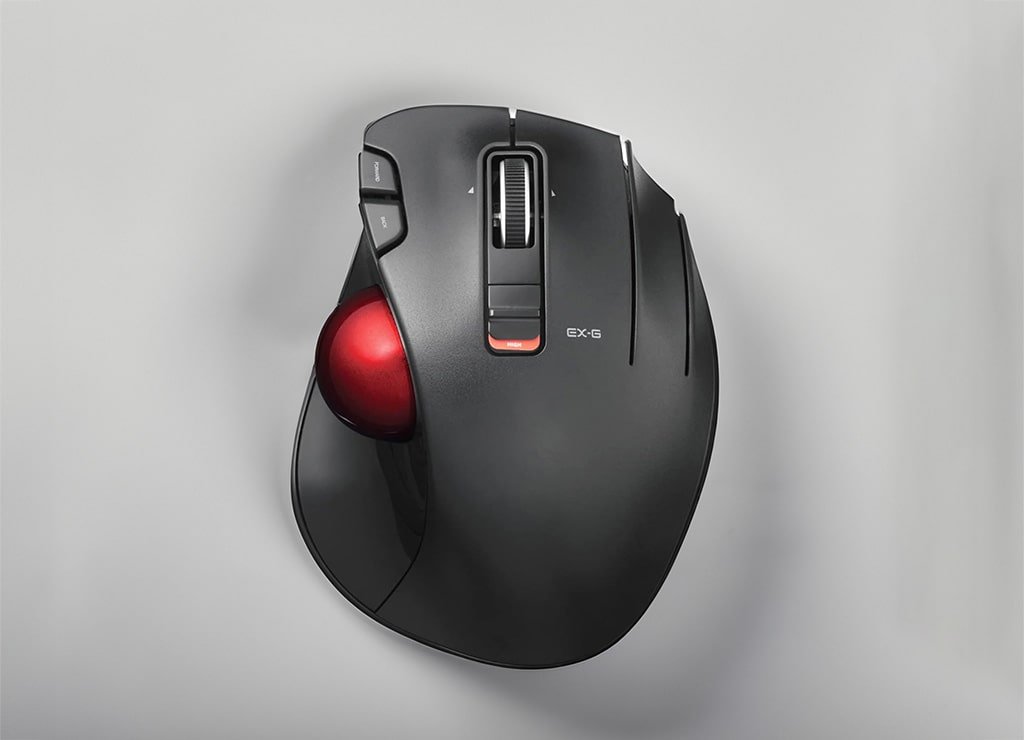
The ELECOM EX-G Trackball Mouse is introduced as a precision-focused pointing device. It features a unique thumb-operated trackball design. This design enhances control and productivity. This mouse is perfect for gaming and design applications. The included software lets you adjust its settings for optimal performance. Connecting the mouse to your computer is easy with either the included USB cable or Bluetooth. The ELECOM EX-G trackball mouse also comes with the EX-G Mouse Manager software. This software lets you change button functions. It also lets you adjust track sensitivity. You can also adjust the trackball’s tilt angle for personal comfort. Overall, the EX-G Trackball Mouse is versatile. It efficiently helps you enhance your work. It also takes gaming to the next level.
Details
The ELECOM EX-G Trackball Mouse is a precision device for performance enhancement. It is designed for designers and other professionals. They need smooth and precise cursor control. The ergonomic design makes sure that extended use doesn’t cause wrist strain. This is due to the contoured palm rest and thumb-activated trackball. The mouse features 11 customizable buttons to improve workflow efficiency. It includes a click-through scroll wheel. A precision optical trackball helps designers get the job done with unmatched accuracy.
The soft rubber grips guarantee a secure and comfortable fit in the user’s hand. Additionally, the adjustable tilt angle allows for personalized positioning. All of these features make the ELECOM EX-G an excellent accessory for professionals who demand the best.
Specifications
- Connectivity: This product can be easily connected using a USB cable or Bluetooth, depending on your preference.
- Trackball: This product comes with a thumb-operated trackball that provides smooth and accurate tracking, making it ideal for long hours of use.
- Programmable buttons: This product comes with 8 programmable buttons that can be customized to perform different functions, making it easier to access frequently used commands.
- DPI: This product has a high DPI (dots per inch) value that ensures precision and efficient movement, and it is customizable to suit your needs.
- Sensor: This product’s optical sensor has a maximum DPI of 2,000, ensuring accurate and fast movement, making it ideal for design and other precision tasks.
- Compatibility: This product is compatible with Windows and MacOS operating systems, making it a versatile option for different users.
- Battery life: This product has a long battery life of up to 70 days on a single charge, making it ideal for frequent travelers or those who use it for extended periods without access to a charger.
Pros
- Unique and ergonomic thumb-operated trackball design for precise cursor control and reduced wrist strain during extended use.
- Customizable buttons, including 11 programmable buttons and a scroll wheel, for personalized workflow and easier access to frequently used commands.
- Adjustable tilt angle for added comfort and convenience.
- Suitable for a variety of applications, including gaming and design tasks.
- Wireless Bluetooth connectivity for added flexibility and convenience.
Cons
- New users may take some time to get used to the thumb-operated trackball.
- Relatively short battery life compared to some competitors.
- Price can be expensive compared to other alternatives.
- Wired connection may limit flexibility compared to wireless models.
- Trackball control may require an adjustment period for new users.
Who is the ELECOM EX-G Trackball Mouse designed for?
The ELECOM EX-G Trackball Mouse is a unique and ergonomically designed pointing device. It offers precise cursor control. It also provides customizable features for enhanced performance. It is an excellent choice for gamers, designers and engineers who value productivity and comfort. The mouse features a thumb-activated trackball for more precise movements and less wrist strain. The mouse’s customizable features give extra control and efficiency for users looking for the perfect setup. The ELECOM Mouse is an excellent choice for those needing precise cursor control. It is also perfect for anyone desiring a comfortable and unique pointing device.
Microsoft Bluetooth Surface Precision Mouse: Premium Design, Exceptional Performance
The Microsoft Bluetooth Surface Precision Mouse is a high-end wireless mouse. It is designed to deliver utmost precision. The mouse boosts productivity for Surface device users. This mouse is perfect for those who want to take their work to the next level. It provides seamless connectivity to your device via Bluetooth and can be easily paired with your Windows or MacOS computer.
Microsoft Mouse and Keyboard Center software lets you change button functions and adjust tracking sensitivity for optimal performance. You can adjust the scroll wheel tension and tilt angle. This lets you personalize your control. It makes your work experience more efficient and enjoyable. Whether you are a professional designer or a casual user, the Microsoft Bluetooth Surface Precision Mouse is perfect. It is designed for those seeking a high-performance wireless mouse. It caters to a wide range of needs.
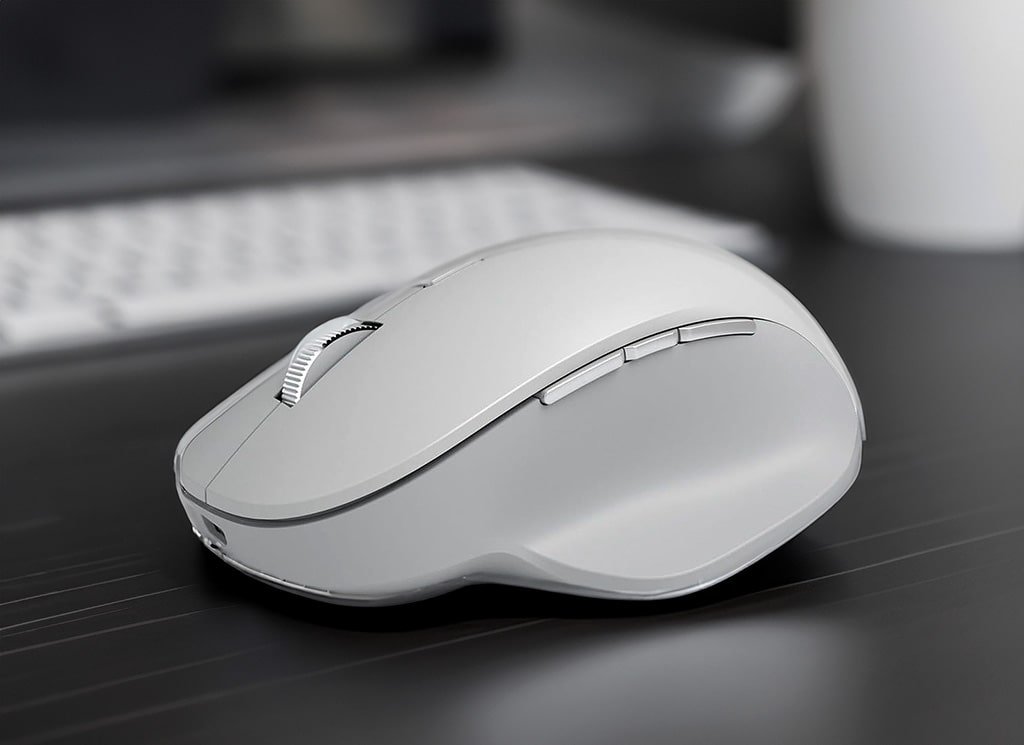
Details
The Microsoft Bluetooth Surface Precision Mouse is a high-quality, high-performance accessory with a stunning aluminum body and ergonomic design. Its sleek, minimalist aesthetic is impressive. The mouse has an ambidextrous grip and soft rubber grips. These features make it comfortable for extended use. The Surface Precision Mouse has 4 programmable buttons. It also features a clickable scroll wheel. It is a versatile tool that meets the needs of designers. Other professionals will also find it useful. Its precise optical tracking provides effortless movement and precise entry, while the rechargeable battery ensures long battery life.
Additionally, the mouse connects wirelessly via Bluetooth for seamless integration with Surface devices and other Windows-based computers. If you want a stylish and comfortable accessory, choose the Surface Precision Mouse. It is also a precise and reliable tool for professional use. It is an exceptional choice.
Specifications
- This product has Bluetooth connectivity, so you can connect it to any Bluetooth-enabled device.
- It has customizable buttons that allow you to program the buttons to your liking and make them easier to use.
- This product has a battery life of up to 3 months on a single charge. It can go a long time without needing recharging.
- It is compatible with both Windows and MacOS, making it versatile and easy to use.
- The product uses an optical sensor that provides up to 1,600 DPI for smooth and precise movement.
Pros
- Premium aluminum design enhances durability and aesthetics, giving the mouse a high-end look and feel.
- Customizable buttons and scroll wheels let users personalize their workflow. This feature makes the mouse a great fit for work and play.
- Ergonomic shape gives comfortable use for extended sessions and reduces wrist and hand strain.
- Long battery life extends use between charges, minimizing the need for frequent recharging.
- Sleek, minimalist design adds a touch of elegance to your workspace or gaming setup.
- Precise optical sensor ensures exact and reliable tracking, increasing user productivity.
- Wireless Bluetooth connectivity allows for seamless integration with a variety of devices. This feature makes the mouse a versatile tool for those who use multiple devices.
Cons
- HHigher price compared to standard mice, making it less accessible to those on a budget.
- Limited compatibility with non-Windows devices, which limit its usefulness for users who primarily use Mac or other non-Windows devices.
- It not offer the precision of high-end wireless mice. This be a drawback for users who need the highest level of accuracy.
- There are fewer customizable buttons than some options. This be a drawback for power users who need a high degree of customization.
- No mouse tilt adjustment, which be a drawback for those who need this feature for work or gaming.
Who should use the Microsoft Bluetooth Surface Precision Mouse?
The Microsoft Bluetooth Surface Precision Mouse is a wireless mouse. It is designed for professionals and designers. These users value productivity, precision, and seamless integration with Surface devices. This mouse offers customizable features, a minimalist design, and precise tracking that enhances the user experience. It is an excellent choice for those looking for a high-quality, versatile mouse with high performance. Its sleek design and advanced features make it ideal for Surface device users. Designers and professionals gain from this mouse when they need a wireless choice that can handle their demanding workloads.
Microsoft Modern Mobile Mouse: A Sleek and Stylish Companion for Mobile Professionals
The Microsoft Modern Mobile Mouse is a sleek and compact wireless mouse. It offers instant connectivity. This makes it ideal for mobile professionals who are always on the go. Designed for both Windows and MacOS devices, this mouse easily connects via Bluetooth for a seamless experience. Its portable, lightweight design allows for optimal productivity while providing a comfortable grip that reduces fatigue during extended use.
Customizable button functions make personalization easy. The adjustable tracking sensitivity through the Microsoft Mouse and Keyboard Center software also helps. Overall, the Microsoft Modern Mobile Mouse is reliable and versatile. It is perfect for anyone seeking a comfortable and efficient wireless mouse. This mouse delivers both performance and style.

Details
The Microsoft Modern Mobile Mouse is the perfect companion for mobile professionals. They need a reliable and stylish mouse to use with their laptop or tablet. Its slim, lightweight design makes it easy to carry. Its ambidextrous shape ensures comfort for both left- and right-handed users. The mouse has a responsive optical sensor. This sensor provides precise cursor control on a variety of surfaces. It also has a smooth scroll wheel. This wheel allows for effortless navigation.
Bluetooth connectivity eliminates the need for dongles or adapters, making it easy to connect to a wide range of devices. Furthermore, the Modern Mobile Mouse comes with 2 programmable buttons. These buttons allow users to change their mouse. This customization suits their needs. Overall, the Microsoft Modern Mobile Mouse is a reliable, functional, and stylish choice that meets the needs of basic tasks.
Specifications
- Wireless connectivity via Bluetooth technology for seamless and hassle-free pairing with your device.
- High-precision optical sensor delivers up to 1,000 DPI for fast, accurate tracking of your movements.
- Adjustable DPI settings from 400 to 1200 DPI, so you can set your mouse sensitivity to the level you prefer.
- Three buttons for easy and intuitive control of your device.
- Lightweight design for comfortable use and easy portability.
- It is compatible with multiple operating systems. These include Windows, MacOS, and Android. This compatibility makes it perfect for use with a wide range of devices.
- The battery life extends up to 3 months on a single charge. This makes it ideal for use on the road. It is also suitable for situations where charging is not possible.
Pros
- Slim, lightweight design makes it highly portable and comfortable to use for extended periods of time.
- Bluetooth connectivity eliminates the need for dongles or adapters, making it easy to connect to multiple devices.
- The mouse has a long battery life, so you can use it for extended periods without having to recharge frequently.
- It is compatible with multiple operating systems, making it versatile and functional across devices.
- The mouse has a responsive optical sensor and a smooth scroll wheel, providing a seamless and efficient user experience.
Cons
- The mouse offers limited customization options compared to some premium models, which may limit its functionality for some users.
- Users with larger hands may find the mouse too small and uncomfortable for extended use.
- The mouse may not offer the same level of precision as larger, high-end wireless mice. This may be a limitation for users who require a higher level of accuracy in their work.
- The mouse lacks a tilt adjustment, which may be a drawback for users whose work requires this feature.
Who is the Microsoft Modern Mobile Mouse for?
Looking for a compact, stylish mouse that provides seamless navigation on the go? Check out the Microsoft Modern Mobile Mouse. This mouse is designed for professionals, students, and anyone who needs a portable, wireless mouse for on-the-go use. It is lightweight, affordable, and delivers reliable performance. Its compact design and long-lasting battery make it a great choice for those who value both mobility and purpose. If you’re a mobile professional, you are looking for a simple mouse for basic tasks. Or maybe you’re a designer seeking a portable, lightweight addition to your toolkit. In either case, the Microsoft Modern Mobile Mouse is an excellent choice.
Conclusion
After reviewing several sources, it is clear that choosing the right wireless mouse or trackball can be a game-changer. This choice can improve productivity. It enhances user experience for designers and professionals alike. The Logitech MX Master 3S stands out for its precision. It is also well-known for its ergonomics. The ELECOM EX-G offers a unique thumb-operated trackball for those who prefer it.
Other products, like the Apple Magic Mouse and Microsoft Surface Precision Mouse, also offer sleek design and customization options. When selecting a wireless pointing device, consider factors like comfort and precision. Assess customization and battery life, too. These factors will guarantee it meets your needs. Similarly, in the world of design, an ergonomic mouse can have a significant impact on comfort and accuracy.
This comprehensive guide presents several options. These include traditional mice, vertical mice, and trackball mice. Each has its own unique design, functionality, comfort, and overall value. It is important to find the mouse that feels most comfortable in your hand and supports your natural movements. By evaluating the information in this guide, you can make an informed decision. This will improve your comfort. It will also enhance your productivity and overall experience.
Frequently Asked Questions
Can I use these mice on both Windows and MacOS?
Yes, most of the mice in this guide are compatible with both Windows and MacOS operating systems. This provides versatility for cross-platform users.
What is the difference between a trackball mouse and a traditional mouse?
A trackball mouse has a stationary trackball. Users manipulate it with their fingers or thumbs to move the cursor. Examples include the Logitech MX Ergo Wireless Trackball Mouse and Nulea Wireless Trackball Mouse. In contrast, a traditional mouse relies on physical movement across a surface.
Are trackballs better for ergonomics?
Trackballs can be a good option for designers who experience wrist pain or discomfort from traditional mice. They eliminate the need for constant arm and hand movements, which can reduce strain.
Is a vertical mouse more ergonomic?
Vertical mice can be more ergonomic for some designers because they promote a more natural grip position, reducing wrist strain. However, it can take some time to get used to using a vertical mouse.
What is the battery life for these mice?
Battery life varies depending on use and model. Most of the mice in this guide offer long-lasting battery life. This can range from several weeks to several months on a single charge. This provides uninterrupted use for extended periods of time.
Are there alternatives for left-handed users?
Yes, several mice featured in this guide offer symmetrical designs for both left- and right-handed users. For example, the Logitech MX Vertical Wireless Mouse provides ergonomic comfort. The Nulea Wireless Trackball Mouse also ensures functionality for all users.
Are wireless mice reliable?
Yes, wireless mice are reliable and provide a stable connection to your computer. However, it’s important to choose a reputable brand and model to ensure reliability.
What factors should I consider when choosing a designer gadget?
When choosing a designer gadget, consider factors such as ergonomic design and customization options. Check for compatibility with your devices. Evaluate the battery life and budget. Prioritize features that meet your specific needs and preferences to ensure optimal performance and user satisfaction.
Tips for Choosing an Ergonomic Mouse
Consider a few things when looking for an ergonomic mouse. Also, remember what you’ve learned in this guide. These include:
- Hand size and grip style: Choose a mouse that fits comfortably in your hand and fits your grip style. Some mice are designed exclusively for right-handed users, while others are designed for both left- and right-handed users.
- Connectivity: Decide whether you want a wired or wireless mouse. Wired mice are more reliable, but wireless mice offer more freedom of movement.
- Software: Some ergonomic mice come with software that lets you customize button functions and adjust tracking sensitivity.
Keep in mind
- Comfort is key: The most important factor in choosing an ergonomic mouse is comfort. Make sure the mouse fits comfortably in your hand and supports your natural movements.
- Try before you buy: If possible, try several mice before making a final decision. This will help you find the one that works best for you.
- Invest in your health: An ergonomic mouse can be a worthwhile investment in your health and well-being. It can help prevent wrist pain, strain and other repetitive-use injuries.
By adopting these suggestions, you can choose the best ergonomic mouse for your needs. This will improve your comfort, productivity, and overall experience.
Thank you for taking the time to read this article that we’ve carefully put together for our readers. We want you to be aware that there are affiliate links in this article. This means that if you buy something through these links, we may earn a commission. We appreciate your support as it helps us keep producing high-quality content. Rest assured that our recommendations are always honest and unbiased.